Everything you need to schedule your operations — nothing you don't. Simple, powerful, and built for real businesses.
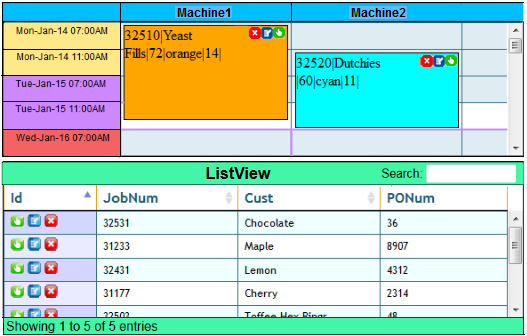
Schedule jobs by dragging them from the list view to their position on the schedule. Rescheduling is just as easy — drag to the new time slot.
A visual Gantt-style schedule gives you an intuitive overview of your entire operation. Spot bottlenecks and free capacity at a glance.
Jobs to be scheduled are shown in the List View with Excel-like features: column sorting and data searching to find jobs quickly.
Assign colors to jobs based on any attribute — customer, priority, job type, status. Make your schedule visually intuitive at a glance.
Three user roles: Schedulers make any change, Editors update job details only, Viewers see the schedule. Control access with ease.
Import job data from spreadsheets, ERP, MRP, WMS, QuickBooks and more. Works with Zapier for automatic data sync with hundreds of apps.
Access your schedule through any web browser on computer, laptop, tablet or smartphone. Your data is always available, always up to date.
Your schedule is secured behind a login screen. Control exactly who sees what with user-level permissions and role-based access.
A job status screen lets you search and view all job details — whether a job is scheduled, in progress, or completed.
Define how long each job takes on each resource. MaxScheduler uses this to help you plan capacity and meet delivery deadlines.
Manage queues of work in front of each machine or resource. See what's coming up and plan ahead with confidence.
Track as many job attributes as you need. MaxScheduler is flexible — no mandatory fields to fill in, unlike rigid ERP and MRP systems.
Route scheduling support for jobs that break into multiple tasks across different resources. Ideal for print shops and complex manufacturing workflows.
Adjust the schedule display to match your workflow. Configure resources, columns, time scales and display attributes to suit your business.
Export schedule data to spreadsheets and other formats. Share schedule information with team members who don't have a MaxScheduler login.
The main screen shows a graphical schedule in the top portion and a List View at the bottom. Jobs are scheduled by dragging from the List View to the schedule — it's that simple.
MaxScheduler works with Zapier, connecting it to over 5,000 apps. Automatically import job data from your accounting system, ERP, CRM, or any other software — eliminating manual data entry and the errors that come with it.
See Integration ExamplesWatch our video walkthroughs or start a free trial to explore MaxScheduler yourself.